Saturday, June 8, 2013
C.S. Computer system (system unit) (What is this?)
The system unit is the computer. Powerful
electronic circuitry that makes up the computer is housed inside the case. Most system unit consist of the computer case with a power supply,
motherboards, processor, memory (ram), hard drive, floppy disk drive, CD-ROM drive, disk controller,
input/output ports, video adapter, and sound board. The variation of the
components inside the system unit is what makes one personal computer more
powerful than another personal computer.
Sunday, June 2, 2013
C.1.5.Modern Digital Video Camera and C.1.6.Printer (What is this?)
Refers
to the capturing, manipulation and storage of video in digital formats. A
digital video (DN) camcorder, for example, is a video camera that captures and
stores images on a digital medium such as a DAT (acronym for digital audio
tape, a type of magnetic tape that uses a scheme called helical scan to record
data). Modern Video Camera is high resolution, more million colours, and it has
video conferencing and video email facility.
Printer
is a device that prints text or illustrations on paper. There are many
different types of printers. Terms of technology utilized, printers fall into
the following categories:
C.1.4.Mouse (What is this?)
A
mouse is a hand held device that controls the movement of the pointer that you
see on your screen. The mouse is used to manage objects on the screen.
Modern
types of mouse
Intellipoint-
Easy scrolling simply roll the wheel forward or backward instead of clicking on
a scroll bar or arrow. Zoom quickly. In or out by holding the CTRL key while
rolling the wheel (in compatible applications). Work hands- free with Auto-
Scroll. Press the wheel, set the scroll speed, and then watch your document
scroll automatically.
Intellipoint
(Optical) Web Mouse w/ Connector- No ball to roll around and get dirty, only an
optical eye. Two additional buttons for easy navigation. Get faster, more
efficient Internet navigation without using toolbars or the keyboard. The extra
buttons, one on each side, act as forward and back buttons for your browser.
New shape and design. Designed for maximum comfort for both left- and right-
handed users, IntelliMouse Web’s new two- toned color scheme add a new look and
feel that will make your systems stand out.
C.1.3. Speaker (What is this?)
Speakers
might be the important part of a new sound system. Today, many PC speakers
include subwoofer to provide enhanced performance for low end bass audio.
Particularly effective for adding impact to the sound effects combat oriented
games, a subwoofer also enhances music and other content. Not everyone needs
the same kind of speakers. After all, that thumping subwoofer might get a tad
disruptive in the office. New speakers are available with 3D Sound (refers to a
speaker set’s ability to create “Surround Sound”, giving the illusion that the
listener is in an actual environment).
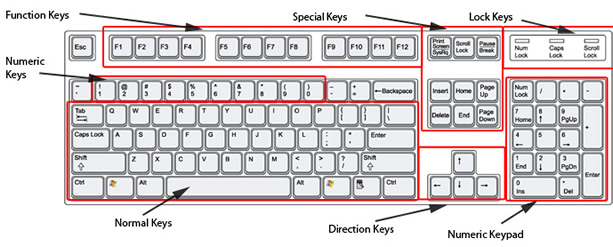
C.1.2. Keyboard (What is this?)
For A Long
Time Keyboards Had Standard 101 Keys Until Windows Started Developing New Keys.
Windows Keys
This Group
Appeared the First (Right after Windows 94). The Group Consists Of 3 Keys,
Which Are Situated Between Alt And Ctrl. WL (Windows Logo) Doubles And Windows
Application Key Is Only On The One Side. In Some Keyboards, There Are Internet
And Multimedia Keys.
C.1.1 Monitor (What is this?)
Monitors
obviously display what is going on in your computer. They can run at various
resolutions and refresh rates. 440x480 is the default resolution for the
windows operating systems (this is a low resolution where objects appear large
and blocky).440x480 just means that 440 pixels are fit across the top of your
monitor and 480up and down. Most users prefer higher resolutions such as
800x400 or 1024x748 all the way up to 1400x1200 (and higher for graphics
professionals). The higher resolutions make objects smaller, but clearer
(because more pixels are fit in the screen). You can fit more objects on a
screen when it is in a higher resolution. Larger monitors are better for
running at the higher resolutions. If you run a high resolution on a small
monitor, the text may be hard to read because of its small size, despite the
clarity.
Flat panel
monitors
Flat panel
monitors can present excellent image quality, use very little power, emit very
little heat and radiation, take up much less space, and are easy on the eyes.
But flat screen monitors cost considerably more than standard monitors,
although prices have been decreasing over time.
Note that a
17 inch flat panel equates to a 19 inch standard monitor and a 14 inch flat
panel equates to a 17inch monitor. This is because the image on these panels
reaches from edge to edge, so a 17 inch flat panel gives you nearly 17 inches
across of image, which is almost identical to what you will get on a 19 inch
standard monitor.
The Modern Computer (What is this?)
Introduction
Modern computer is designed to deliver performance across applications and usages where end users can truly appreciate and experience the performance. These applications include internet audio and streaming video, image processing, video content creation, speech, 3d, CAD, games, multimedia and multi-tasking user environments.
Modern computer can perform high speed processing, sound and video. And it has bigger memory, large capacity of hard disk. Thus it can run sophisticated software like AutoCAD, video capturing and video editing. Most new software needs large memory and large hard disk capacity. To see clear video films need high resolution monitor, high speed CD-ROMS and large hard disk capacity. Now bigger than 40 GB hard disks and 42x CD ROMS are available in the market. To capture and edit films need more memory (around 244 MB) and 32 MB video memory and large hard disk capacity.
A modern computer can use as a television, radio, video camera, video editing units etc.